Explore key tools, smart features, and expert insights...
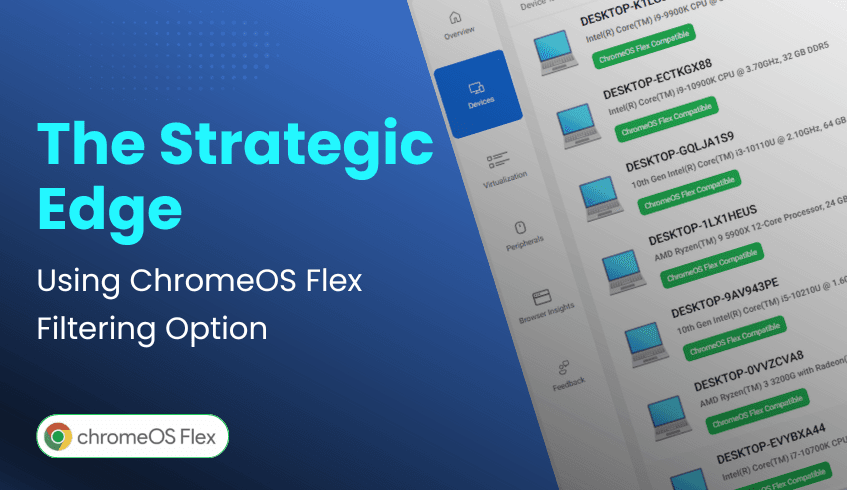
For IT leaders driving digital transformation, the challenge isn’t just adopting new technology, it’s modernizing infrastructure in a way that’s efficient and cost-effective. ChromeOS, combined with the ChromeOS Readiness Tool, provides the intelligence to achieve both. A standout feature within the ChromeOS Readiness Tool dashboard is ChromeOS Flex filtering, which gives organizations a strategic advantage in optimizing hardware investments.
ChromeOS Flex is designed to revitalize existing PCs and Macs, extending the life of legacy devices without the need for costly replacements. This approach not only helps organizations meet financial goals but also supports sustainability by reducing e-waste.
The ChromeOS Readiness Tool’s web-based dashboard serves as the command center for device assessments. Within the Devices section, IT teams can view the readiness status of every system, identifying which are compatible with ChromeOS or ChromeOS Flex. This quick snapshot helps leaders understand exactly where each device stands in the migration process.
The real power lies in the dashboard’s filtering feature, which allows teams to isolate devices compatible with ChromeOS Flex. This enables IT leaders to:
Identify opportunities: Pinpoint older machines that can be upgraded with Flex.
Plan deployments: Build targeted groups for Flex migration to minimize disruption.
Control costs: Extend the lifespan of current assets instead of investing in new hardware.
By focusing on Flex-ready devices, organizations can modernize more strategically, balancing performance, cost efficiency, and sustainability.
The ChromeOS Readiness Tool doesn’t just assess, it empowers. With ChromeOS Flex filtering, IT teams gain the clarity needed to maximize existing hardware, cut costs, and move toward a modern, cloud-first infrastructure with confidence.

In today’s enterprise landscape, IT leaders are under pressure to modernize while balancing security, cost, and employee experience. Many are making the strategic shift from traditional Windows environments to ChromeOS, a cloud-first platform built for agility and scale. But making such a move successfully requires more than just intent, it demands clear, data-driven insights. That’s where the ChromeOS Readiness Tool becomes indispensable.
ChromeOS is a game-changer, offering leaders a clear path to modernize and optimize IT operations:
Cost & Sustainability: Extends hardware life with ChromeOS Flex, reduces e-waste and hardware costs, and consumes less energy than comparable devices.
Robust Security: Multi-layered defenses like sandboxing, verified boot, and automatic updates minimize cyber threats and simplify IT security management.
Cloud-Native Collaboration: Seamless integration with Google Workspace enables real-time, anywhere access, essential for hybrid and distributed teams.
Agile Management & Scalability: Zero-touch enrollment and centralized cloud management make large-scale deployments faster, with lower administrative overhead.
The ChromeOS Readiness Tool is a comprehensive compatibility assessment platform that evaluates your IT environment’s readiness for ChromeOS. It transforms uncertainty into clarity by providing the insights IT leaders need to plan with confidence.
Here’s how it helps IT teams succeed:
Granular Compatibility Data: Assesses Windows applications, classifying them as ChromeOS-ready, Possibly Ready, Blockers, or Unknown. Devices are categorized as Ready to Switch, Ready with Verification, or Blocked from Switching. This provides a clear roadmap and highlights potential challenges early.
Insightful Usage Analytics: The Browser Insights feature offers a detailed view of browser and extension usage, versions, and activity across the organization. This allows IT to manage risky extensions, streamline browser use, and better align with ChromeOS and Chrome Enterprise Browser. Foreground and background application data reflect actual usage patterns for more accurate readiness planning.
Actionable Dashboards & Virtualization Solutions: Intuitive dashboards (including Pro and Partner views) deliver readiness scores, device and peripheral assessments, and virtualization recommendations via Cameyo for applications that are not immediately compatible.
Data Security by Design: All collected data stays within the organization, safeguarded by encryption protocols. Access to readiness dashboards requires a private key, ensuring that only authorized users can view sensitive details.
Armed with insights from the ChromeOS Readiness Tool, IT leaders can:
Streamline Migration: Minimize downtime, eliminate guesswork, and save resources.
Plan Proactively: Anticipate challenges before they occur and focus on forward-looking innovation.
Guide with Clarity: Deliver smoother, expert-led migrations that support business goals.
IT leaders are winning with ChromeOS because they make informed, insight-driven decisions. The ChromeOS Readiness Tool transforms complex compatibility and usage data into clear strategies, empowering organizations to embrace ChromeOS with its insights. The result is a smarter, more secure, and future-ready IT ecosystem that redefines what modernization looks like.
In today’s business landscape, environmental responsibility is no longer optional; it’s essential. Organizations are seeking IT solutions that not only deliver efficiency and security but also reduce their ecological footprint. ChromeOS, Google’s cloud-native operating system, stands out as a platform designed for eco-conscious digital transformation. And to ensure organizations transition smoothly, the ChromeOS Readiness Tool provides the insights and clarity needed to make sustainability a practical reality.
While ChromeOS sets the foundation for sustainable IT, the ChromeOS Readiness Tool ensures organizations achieve this vision strategically. By assessing applications, devices, and peripherals, the tool provides actionable insights that drive greener decisions.
Optimizing Existing Resources: The tool categorizes applications as ChromeOS-ready, Possibly Ready, Blockers, or Unknown, and devices as Ready to Switch, Ready with Verification, or Blocked from Switching. This helps IT teams identify hardware suitable for ChromeOS Flex, reducing unnecessary purchases.
Minimizing E-Waste: By pinpointing devices that can be reused instead of replaced, the tool empowers organizations to extend hardware lifespans and significantly cut down electronic waste.
Driving Cost & Time Efficiency: Early visibility into potential challenges saves resources and ensures smoother migration. Efficient planning avoids wasteful spending, aligning IT transformation with broader sustainability goals.
ChromeOS is more than an operating system, it’s a catalyst for sustainable digital transformation. From extending device life to reducing energy use, it offers organizations a clear path toward greener IT practices. The ChromeOS Readiness Tool strengthens this journey by providing the insights abd clarity needed to reuse resources, reduce e-waste, and migrate with confidence.
By combining ChromeOS with the ChromeOS Readiness Tool, businesses can modernize their IT while making a meaningful contribution to environmental responsibility, delivering a future that is both digital and sustainable.
If you are ready to align your IT with sustainability goals, explore the ChromeOS Readiness Tool today and take the first step toward an eco-friendly digital transformation.
In today’s fast-paced digital world, educational institutions and enterprises need IT solutions that are efficient, secure, cost-effective, and adaptable. Google ChromeOS is emerging as a leading operating system built for the cloud, offering agility, strong security, and simplified management. For organizations looking to modernize their digital infrastructure, ChromeOS provides a future-ready foundation.
Cost-Effective Modernization and Sustainability With ChromeOS Flex, organizations can extend the life of existing PCs and Macs, reducing e-waste and hardware costs. ChromeOS devices also consume less energy than comparable devices and receive automatic updates, supporting both financial and environmental goals.
Security by Design ChromeOS employs multi-layered defenses such as sandboxing, verified boot, and automatic updates. This reduces exposure to malware and cyber threats while minimizing reliance on third-party security tools, streamlining IT management.
Cloud-First Collaboration ChromeOS integrates deeply with Google Workspace, enabling seamless communication and real-time collaboration through Gmail, Google Meet, Google Chat, and other productivity apps. This is essential for remote and hybrid learning and working environments.
Rapid Deployment and Simplified Management With zero-touch enrollment and centralized cloud-based management, IT teams can deploy ChromeOS devices at scale quickly and efficiently. Its user-friendly interface reduces onboarding time for both students and employees.
Scalability for Growth Whether expanding classrooms or global operations, ChromeOS supports large-scale provisioning and consistent policy enforcement. Integration with cloud services and Virtual Desktop Infrastructures (VDIs) ensures scalability without being tied down by legacy systems.
Adopting ChromeOS may seem complex, but the ChromeOS Readiness Tool simplifies the process by offering a clear, data-driven migration roadmap. It evaluates applications, devices, and peripherals to ensure compatibility and provides actionable insights for IT teams.
Comprehensive Compatibility Assessment The tool classifies Windows applications as ChromeOS-ready, Possibly ready, or Blockers, while devices are categorized as Ready to Switch, Ready with Verification, or Blocked from Switching. This clarity eliminates guesswork and helps IT leaders prioritize actions for smoother transitions.
Secure Data Handling Sensitive information stays within the organization and is protected with encryption protocols, ensuring only authorized personnel have access. This builds trust while supporting strict data privacy requirements.
Flexible Deployment The tool offers multiple deployment options to fit different infrastructures:
Enterprise Installation: for Active Directory and GPO-based environments.
Other Deployment Installation: for cloud-first setups and Unified Endpoint Management (UEM) systems.
Strategic Recommendations & Virtualization For applications that cannot run natively, the tool identifies virtualization needs and recommends solutions like Cameyo to maintain continuity. This ensures organizations can transition without losing access to critical tools.
Browser Insights for Secure Management The Browser Insights feature provides visibility into browser and extension usage, including version distribution and risky extensions. This allows IT teams to enforce policies, reduce vulnerabilities, and strengthen security compliance.
ChromeOS is a powerful solution for both education and enterprise, combining security, cost savings, scalability, and cloud-native design. The ChromeOS Readiness Tool removes uncertainty from migration by offering clear compatibility assessments, strong data protections, and actionable insights. Together, they enable organizations to adopt ChromeOS with confidence, unlocking innovation, efficiency, and long-term sustainability.
Moving from Windows to ChromeOS is more than just an operating system switch, it’s a fresh, modern way of working. For businesses, this transition represents not only a step into the cloud-first future but also a chance to simplify IT, strengthen security, and cut costs. With the ChromeOS Readiness Tool, organizations can transform what might seem like a daunting migration into a smooth, insightful, and even exciting experience.
The ChromeOS Readiness Tool provides a structured path for migration, removing guesswork and giving IT teams clarity every step of the way.
Clear Compatibility Insights The tool analyzes applications and devices, classifying them into readiness categories:
Apps: ChromeOS-ready, Possibly ready, Blockers or Unknown
Devices: Ready to Switch, Ready with Verification, or Blocked from Switching
This ensures IT leaders know exactly where they stand before moving forward with ChromeOS.
Handling Blockers with Smart Solutions For apps that don’t work natively, the tool recommends virtualization options, such as Cameyo, to keep critical workflows running smoothly during and after migration.
Flexible Deployment Options
Enterprise Flow: Designed for Active Directory and on-premise infrastructures with automated agent deployment.
Other Deployment Flow: Built for cloud-based environments and Unified Endpoint Management (UEM) systems, with manual setup flexibility.
Strong Data Security All assessment data stays within the organization and is encrypted with protocols. Only authorized personnel with a private key can view results, ensuring privacy and control.
Actionable Dashboards & Reports An intuitive web dashboard provides readiness scores, real-time device assessments, and detailed Browser Insights for managing browser versions and extensions. IT teams can also export raw data for deeper analysis in tools like Looker, Tableau, or Power BI.
Switching from Windows to ChromeOS offers more than technical gains, it brings valuable lessons for IT leaders:
Lesson 1: Assess Before You Move. Guesswork is costly. Detailed compatibility insights help avoid surprises.
Lesson 2: Security Should Be Native. With built-in protections and strict access controls, ChromeOS simplifies security.
Lesson 3: One Size Doesn’t Fit All. Flexible deployment flows ensure migration adapts to your infrastructure.
Lesson 4: Data Becomes Your Roadmap. Actionable insights guide efficiency and cost savings by flagging blockers early.
Lesson 5: The Future is Cloud-First. Migration is not the end, it’s the start of ongoing adaptability and innovation.
Migrating from Windows to ChromeOS is not just a practical IT decision, it’s a bold, exciting step toward a simpler, more secure, and future-ready enterprise. With the ChromeOS Readiness Tool, organizations gain the clarity, confidence, and strategy to make the move successfully. Leaving behind legacy systems has never been smarter.
Enterprises today need IT solutions that are flexible, secure, cost-efficient, and sustainable. Traditional hardware-heavy setups are being replaced by cloud-first models, with ChromeOS Flex at the forefront. By repurposing existing devices and pairing with the ChromeOS Readiness Tool, organizations can modernize their infrastructure while maintaining agility and control.
ChromeOS Flex transforms how enterprises manage devices by enabling installation on older PCs and Macs. Key advantages include:
Cost Savings & Sustainability – Extend device lifecycles, reduce hardware spend, and cut e-waste. ChromeOS devices also use less energy than traditional machines.
Built-in Security – Multi-layered protection through sandboxing, verified boot, and automatic updates reduces the need for third-party security solutions.
Cloud-Native Collaboration – Employees can work anywhere, with seamless integration into Google Workspace for real-time productivity.
Easy Deployment & Scale – Zero-touch enrollment and centralized management simplify provisioning, onboarding, and scaling across thousands of devices.
The ChromeOS Readiness Tool provides the intelligence IT teams need to transition smoothly:
Compatibility Assessment – Analyzes Windows apps, devices, and peripherals, categorizing them as ChromeOS-ready, Possibly Ready, or Blocker. Devices are flagged as Ready to Switch, Ready with Verification, or Blocked from Switching.
Virtualization Guidance – For applications not natively supported, the tool recommends virtualization solutions like Cameyo to ensure continuity.
Browser Insights – Delivers visibility into browser and extension usage, helping IT manage risks and standardize environments.
Actionable Recommendations – Goes beyond raw data with tailored advice to support informed decision-making.
The ChromeOS Readiness Tool adapts to different enterprise setups:
Enterprise Flow – For Active Directory and GPO environments, with automated data collection via on-premise or cloud storage.
Other Deployment Flow – For UEM-driven, cloud-based environments without Active Directory, with manual setup options.
All data stays within the organization’s NSF or in GCP (if chosen), safeguarded by encryption. Access requires a private key generated during deployment, ensuring only authorized users can view readiness details.
ChromeOS Flex and the ChromeOS Readiness Tool together provide a clear path for IT modernization. By extending hardware life, strengthening security, and simplifying management, enterprises can confidently reduce costs and future-proof operations. The ChromeOS Readiness Tool delivers not just compatibility checks, but a strategic blueprint for migration.
Begin your journey at chromeosreadinesstool.com and see how the ChromeOS Readiness Tool can accelerate your move to ChromeOS Flex.
Enterprise IT is at a turning point. Traditional models, anchored in on-premise infrastructure, costly refresh cycles, and complex security stacks, are being replaced by cloud-first, user-centric approaches. A ChromeOS-first world accelerates this shift, redefining how IT departments deliver value, faster, leaner, and more securely.
Cost-Efficient, Sustainable Modernization With ChromeOS Flex, enterprises can repurpose existing PCs and Macs instead of discarding them. This not only reduces capital expenditure but also extends hardware life and cuts e-waste. Automatic updates and lower energy consumption drive both financial and environmental sustainability.
Security Built In ChromeOS brings multi-layered protection by default, sandboxing, verified boot, and automated patching. Unlike legacy systems that rely heavily on third-party tools, this built-in approach minimizes vulnerabilities while freeing IT teams to focus on strategic security initiatives.
Cloud-Native Collaboration ChromeOS integrates seamlessly with Google Workspace, enabling secure access to work from anywhere and real-time collaboration across Meet, Gmail, Docs, and more. IT shifts its role from maintaining infrastructure to orchestrating secure access and optimizing cloud service delivery.
Simplified Deployment and Management Features like zero-touch enrollment and centralized, cloud-based policy management significantly reduce administrative effort. Employees can be onboarded in minutes, while IT gains full control through a unified management console.
Scalable by Design Whether deploying hundreds or thousands of devices, ChromeOS scales without adding complexity. Consistent policies, remote updates, and integration with VDI solutions ensure IT can grow seamlessly alongside business needs.
Adopting a ChromeOS-first approach requires visibility into the current IT landscape. The ChromeOS Readiness Tool provides that visibility by:
Assessing application and device readiness: It categorizes apps as ChromeOS Ready, Possibly Ready, Blocker, or Unknown, and devices as Ready to Switch, Ready with Verification, or Blocked from Switching.
Delivering actionable insights: Browser and extension usage reports highlight risks and compatibility gaps, guiding IT teams to streamline and secure transitions.
Supporting flexible deployment: Offers both enterprise (Active Directory/GPO) and cloud-native flows, aligning with each organization’s infrastructure.
Ensuring data security: With AES and RSA encryption plus GDPR compliance, ChromeOS Readiness Tool safeguards sensitive migration data.
Providing intuitive dashboards: Readiness scores, compatibility breakdowns, and virtualization recommendations (e.g., Cameyo for blockers) help IT plan migrations with precision.
A ChromeOS-first world is not just about new devices; it’s about transforming enterprise IT into a cloud-native, secure, and scalable enabler of innovation. ChromeOS provides the foundation, while the ChromeOS Readiness Tool ensures migrations are informed, compliant, and low-risk. Together, they enable IT to evolve from maintenance-heavy operations to strategic drivers of business growth.
In a rapidly evolving digital era, enterprises need IT infrastructures that are not only secure and resilient but also flexible enough to adapt to future challenges. Transitioning to cloud-based operating systems is a crucial step in achieving this goal. With Chrome OS, Google’s cloud-native operating system, and the Chrome OS Readiness Tool, organizations gain the agility, security, and analytics required to modernize confidently and stay future-ready.
ChromeOS is more than an operating system, it’s a strategic enabler of digital transformation. Here’s how it strengthens IT for the long term:
Cloud-Native Agility and Scalability: Built for the cloud, ChromeOS allows employees to work from anywhere, on any device. Seamless integration with cloud services and VDIs ensures enterprises can scale without legacy constraints.
Security by Design: With sandboxing, verified boot, and automatic updates, ChromeOS minimizes malware and cyber risks, delivering long-term protection.
Cost Efficiency and Sustainability: ChromeOS Flex extends the life of existing hardware, reducing e-waste and hardware spend. Devices consume less energy and receive updates, aligning with financial and environmental goals.
Simplified Deployment and Management: Zero-touch enrollment and centralized management cut IT overhead, making device rollout and monitoring more efficient.
Transitioning to ChromeOS requires informed planning. The ChromeOS Readiness Tool provides comprehensive compatibility assessments across applications, devices, and peripherals, delivering the insights IT teams need to build a smooth migration roadmap.
Clear Compatibility Insights: Applications are classified as Chrome Ready, Possibly Ready, or Blockers. Devices are categorized as Ready to Switch, Ready with Verification, or Blocked from Switching. This structured view enables strategic decisions and highlights where virtualization or replacements are needed.
Secure Data Handling: All data collected remains under your organization’s control. Strong encryption ensures privacy, with only authorized personnel able to access readiness results.
Flexible Deployment Options: The tool adapts to different infrastructures, supporting Active Directory with on-premise storage or cloud-based setups with GCP storage buckets or Other Deployment Options that focus on UEMs
Intuitive Dashboards: Partner and Pro dashboards provide readiness scores, real-time device insights, and browser data to guide IT teams with actionable intelligence.
Continuous Evolution: With regular updates, the tool’s analytics grow stronger. Upcoming features include Workspace compatibility insights, app usage statistics, and mapping to Workspace alternatives, keeping it aligned with future enterprise needs.
Future-proofing IT infrastructure requires more than upgrades; it demands a forward-looking strategy. ChromeOS delivers cloud-native agility, built-in security, and cost-effective sustainability, while the ChromeOS Readiness Tool provides the analytics to plan and execute migration with confidence. Together, they empower enterprises to modernize their IT environments and prepare for what’s next.
Start your journey toward a smarter, more resilient IT future with ChromeOS and the ChromeOS Readiness Tool today.
Enterprises today are under constant pressure to modernize IT infrastructure while keeping costs under control. For many, ChromeOS Flex offers the ideal solution, breathing new life into existing PCs and Macs, reducing hardware spend, and delivering cloud-native security. But a successful migration requires clarity on application compatibility, device readiness, and potential blockers. This is where the ChromeOS Readiness Tool becomes highly valuable, providing the insights IT leaders need to ensure a smooth, cost-effective transition.
The ChromeOS Readiness Tool is a comprehensive assessment solution that evaluates your IT environment before migration. It analyzes:
Application usage: Categorizing apps as ChromeOS Ready, Possibly Ready, Blockers, or Unknown.
Device readiness: Classifying devices as Ready to Switch, Ready with Verification, or Blocked from Switching.
Peripheral integration: Identifying compatibility of connected hardware.
It also recommends virtualization (e.g., Cameyo) for apps that can’t run natively, preventing disruptions after migration.
The tool helps maximize return on investment through:
Enterprise Installation (Enterprise Flow): Best for Active Directory environments with on-prem infrastructure.
Other Installation: Optimized for UEM and cloud-based environments without Active Directory.
High-level readiness insights and detailed compatibility breakdowns.
Browser Insights shows browser versions, usage, and extensions across your organization.
Pro and Partner dashboards for deeper reporting and tailored insights.
Data is encrypted and remains within your organization.
Access requires the private key generated at deployment, ensuring that only authorized IT admins can view readiness details.
Recommendations are tailored to your specific environment, helping you avoid hidden migration costs and delays.
Using the ChromeOS Readiness Tool in your ChromeOS Flex migration delivers measurable returns:
Hardware Cost Savings & Sustainability Extend the life of existing devices, reduce e-waste, and avoid large-scale hardware refreshes. ChromeOS Flex devices also consume up to 46% less energy, lowering operational costs.
Predictable Migration By identifying challenges early, the tool removes guesswork, enabling a streamlined, disruption-free transition.
Time & Resource Efficiency Reduces downtime and IT workload by flagging blockers and providing alternatives before migration begins.
Enhanced Security Combined with ChromeOS security (sandboxing, verified boot, automatic updates), the tool’s secure handling of data strengthens enterprise defenses while reducing reliance on costly third-party solutions.
Future-Proof IT Strategy ChromeOS Flex supports zero-touch enrollment, centralized management, and scalability, ensuring long-term adaptability in evolving digital environments.
Modernizing with ChromeOS Flex doesn’t have to be complex. The ChromeOS Readiness Tool provides the insights you need, from deployment flexibility to actionable dashboards and secure, compliant data handling.
Visit chromeosreadinesstool.com to schedule a demo, explore deployment options, and start building a smarter, cost-efficient migration strategy today.